 ]]>
]]>The Siebel upgrade project typically consists of numerous iterations even before the actual development and bug fixes take effect. It is wise to follow the age old adage, measure twice cut once. It makes practical sense to not upgrade the development instance till the upgrade team is absolutely sure of the upgrade process itself, since there will be slight variations depending on the level of customization on the existing application. More importantly, since the upgrade itself is fairly time consuming, there may still be development ongoing on the previous versions.
To minimize the risk, it is a good idea to create a new instance before the start of the upgrade project. How this helps is in two distinct ways:
- The new instance can be used as a sandbox instance with a pure vanilla version of Siebel running on it. This is important to identify how the existing customized application fares against the existing vanilla instance. The sandbox can also assist business analysts in demonstrating the vanilla functionality to the business groups. This assists in removing unnecessary customizations from the application.
- In the event that a decision is taken to perform an in place upgrade this instance should be the first place an upgrade is performed, so that the existing development instance can be shielded against the upgrade project.
To further reduce risks and minimize costs it is advisable to move towards a cloud based provider to either:
- Prepare a Sandbox
- Prepare an instance for the initial upgrade.
For the purpose of the Siebel Sandbox or the temporary development instance we will be requiring the following architecture:
- Server 1: Siebel Web Server, Siebel Gateway Server.
- Server 2: Siebel Database, Siebel Application Server
- Server 3: Siebel Tools, Siebel Web Client, Siebel Application Server.
Going by past experience on multiple Siebel upgrade projects, the flexibility and the cost benefit offered by the Amazon Web services (AWS) EC2 infrastructure cannot be ignored. This article focusses primarily on how to setup and configure an Amazon EC2 instance and prepare it to work with Siebel. That said, this article can also be used to setup amazon instances for any application and not necessarily Siebel.
The first step, obviously is to logon to http://aws.amazon.com and sign up. You will also be required to setup some kind of a payment method. Most corporate users will have logins provided by amazon which should be used to setup the instances. . Individual users on the other hand would definitely be required to set up a payment method before the instance can be setup.
Once the logon is done the AWS services page opens up.
Creation of the instances
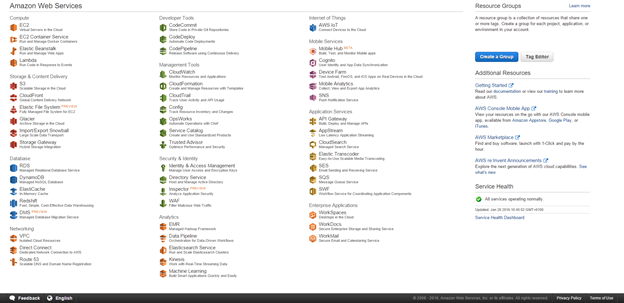
Click on EC2
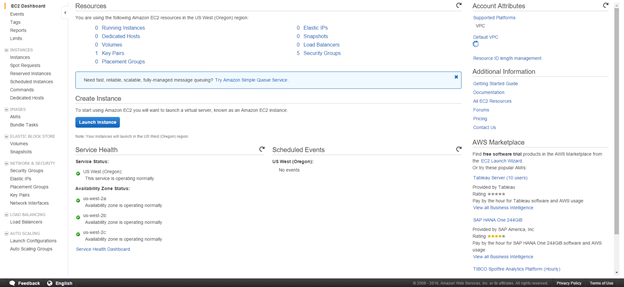
Click on Instances
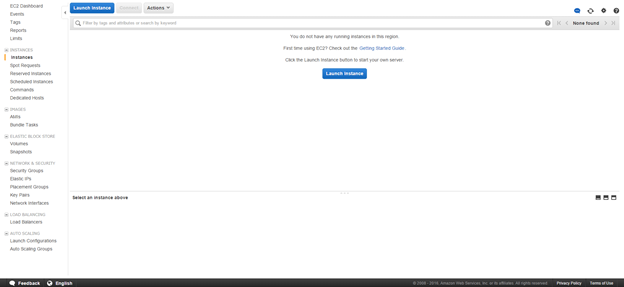
Click on Launch Instance. This is the first step in creating an Amazon Server for yourself.
Scroll down to Microsoft Server 2008 R2 Base. We need to choose Windows 2008 R2 since Windows 2012 R2 is still not supported by Siebel IP 2015.
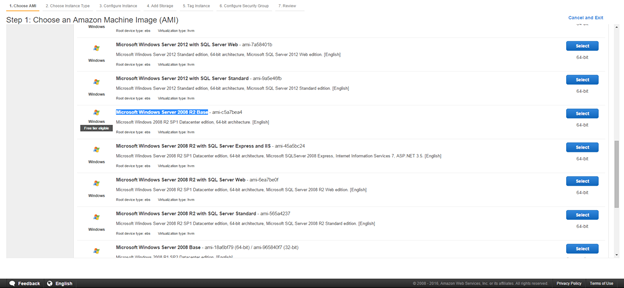
Click Select
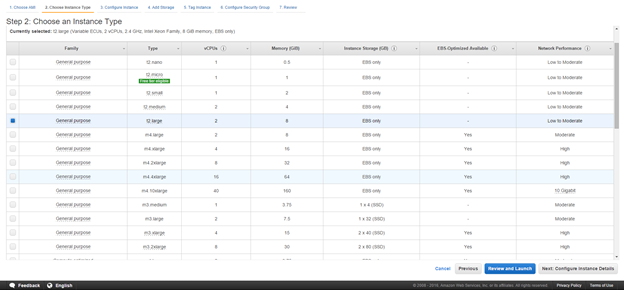
Select T2 Large and click configure instance details. This will be the database server or the Server hosting the Oracle Database which the Siebel servers will run on.
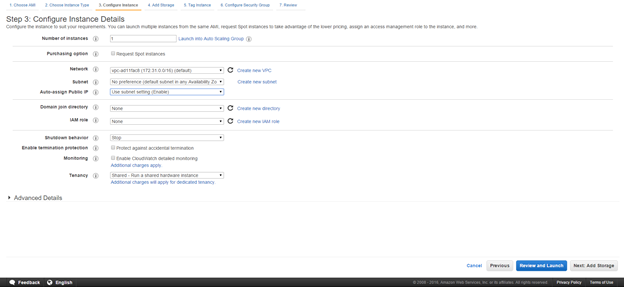
Keep the defaults and click add Storage
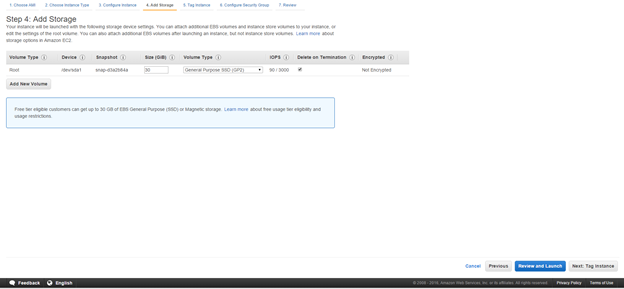
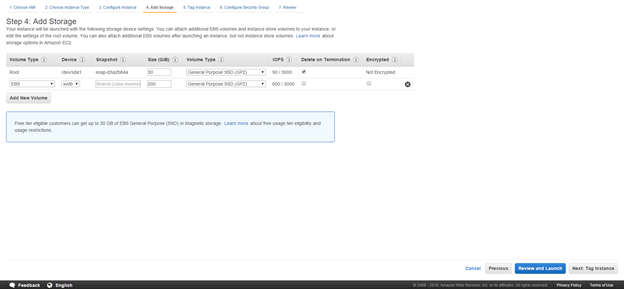
Click Add New Volume and add a 200 GB volume. For most databases this should be sufficient. 200 GB is more than sufficient for a sandbox environment. In the event that an in place upgrade is being performed, most development databases rarely reach 200 GB.
Click Tag Instance to setup a meaningful name for the instance.
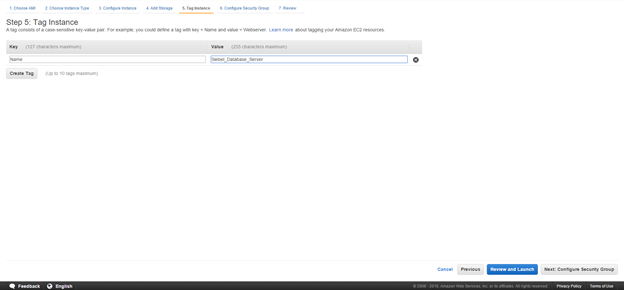
Click Next on Configure security Group. This is critical for multiple reasons:
- The security group ensures that access between the servers is free.
- Since AWS instances can be accessed by anyone across the globe, it makes sense to restrict access to specific IP addresses only.
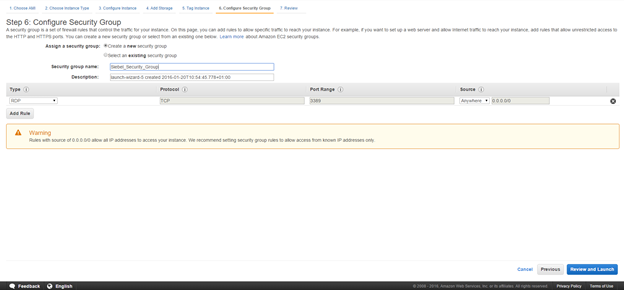
Type in a name for a new security group and click Review and Launch
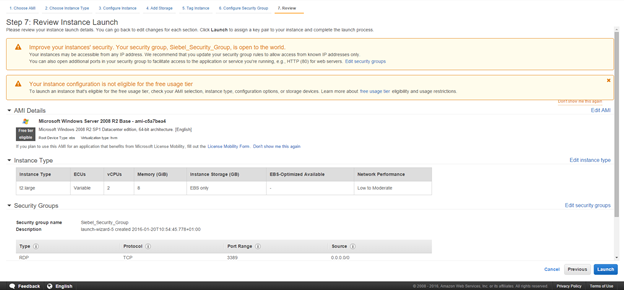
Click on Launch
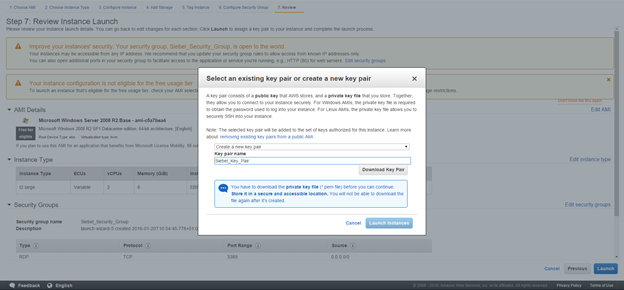
Download the Key pair. The key pair is important for getting access to the instance. Please ensure that this file is saved and stored somewhere secure.
Once downloaded launch the instance.
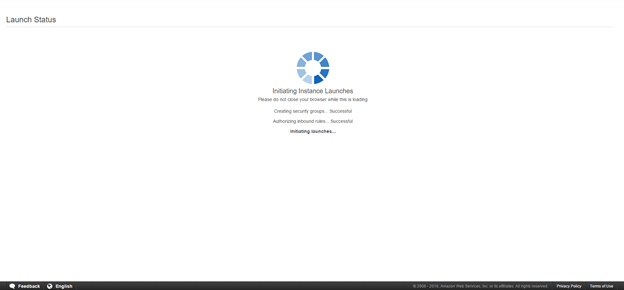
This will launch the instance.
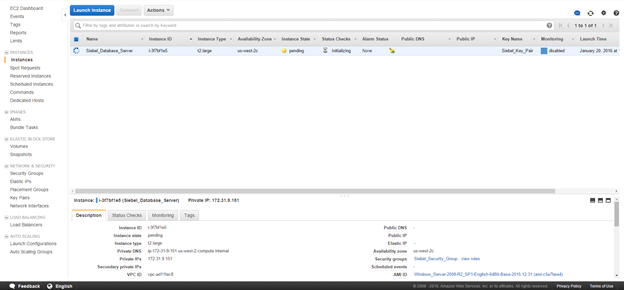
The steps need to be repeated for 2 more servers. However the specifications can be slightly lower for them.
Click on Launch instance again.
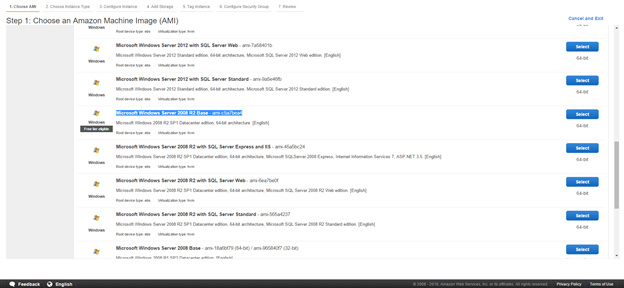
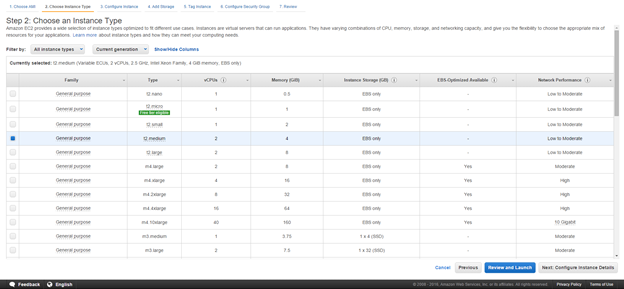
Choose T2 medium since the other two servers on the instance do not need an extremely high processing power or memory.
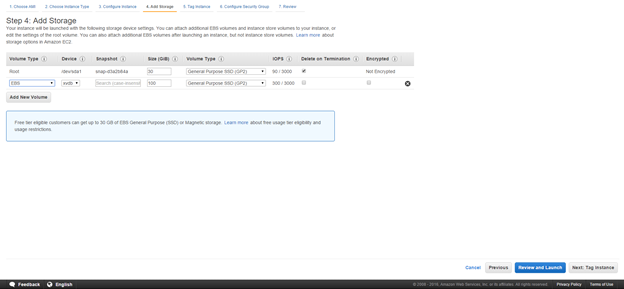
Since these servers are lower end, 100 GB of disk space is more than sufficient. Please note that the virtual disks are charged separately and hence we should use only as much as necessary.
Tag the instance as required.

While configuring the security group for the next 2 servers, we pick the security group created during the first server setup instead of creating a new one. We need to ensure that we select “Select an existing security group” so that all the security groups are displayed.
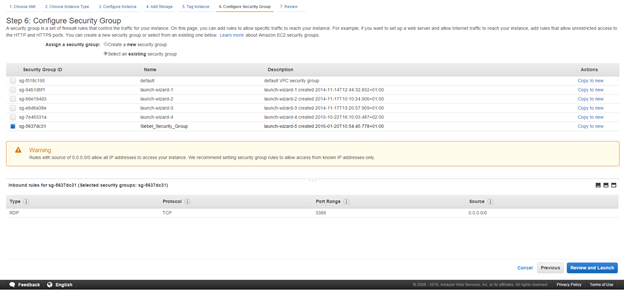
Once done, we review the configuration.
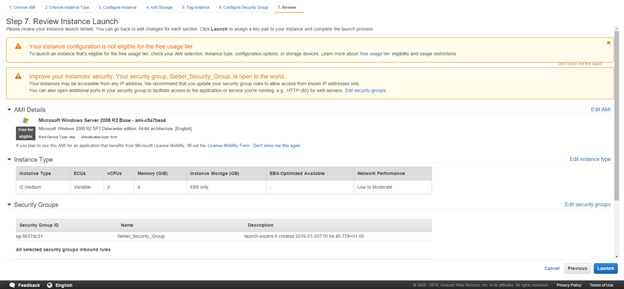
Click on Launch. This time around, we do not create a new key pair and instead select choose an existing key pair and pick the key pair from earlier.
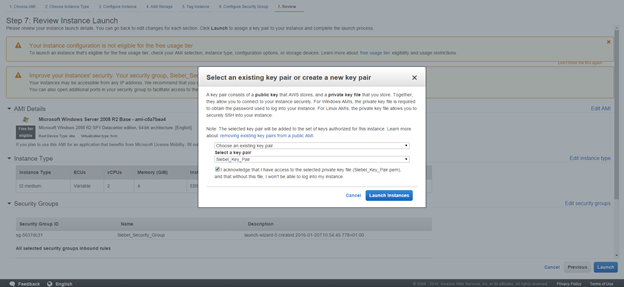
Now we can launch the instance.
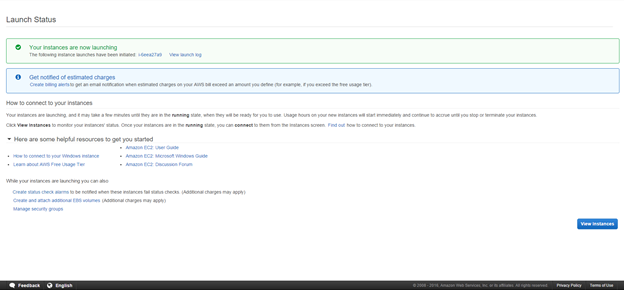
We need to repeat these steps for another instance which will be the last server. At the end of the exercise there should be 3 servers.
- Siebel Database Server
- Siebel Web_Gateway_Server
- Siebel_Application_Server.
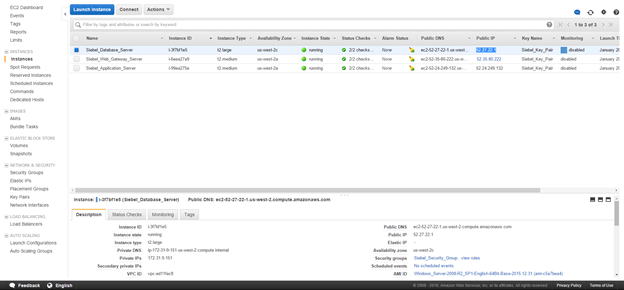
The same will be visible in the instances screen.
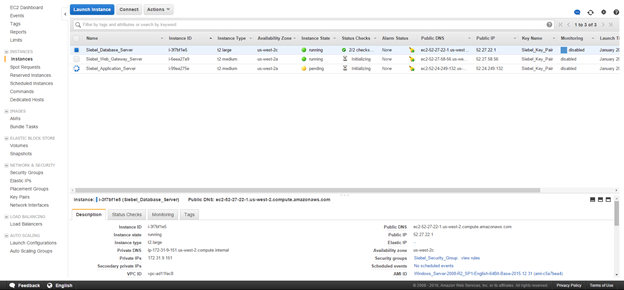
Wait for all the servers to get into a running state.
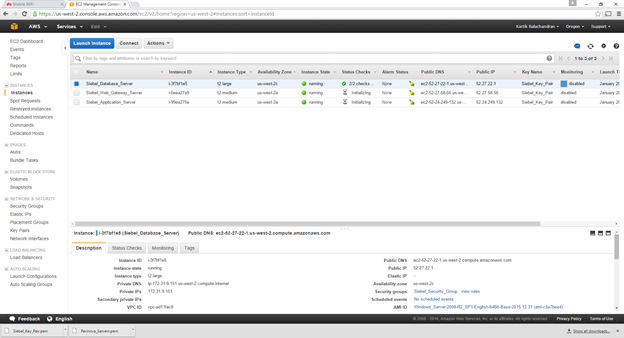
This concludes the creation of the instances.
Setting up of the Elastic IP
The elastic IP is a static public IP address allocated to your instance. This is mandatory for atleast the webserver. While all servers by default have public IP addresses allocated, these change with every reboot. Elastic IP addresses on the other hand do not change.
Click on Elastic IP’s. 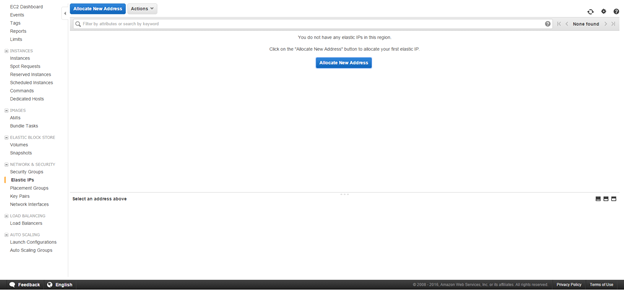
Click on Allocate new Address
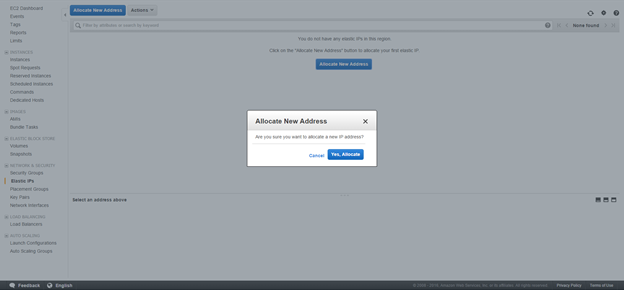
Click Yes
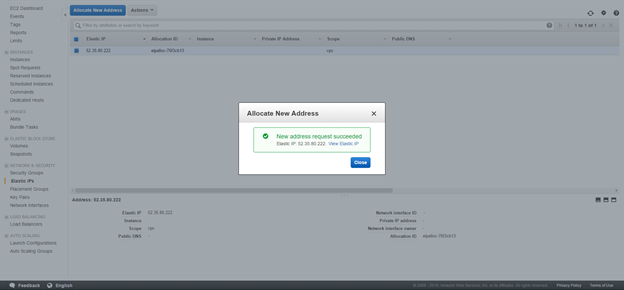
We now need to associate the newly created elastic IP address to the server designated as the webserver.
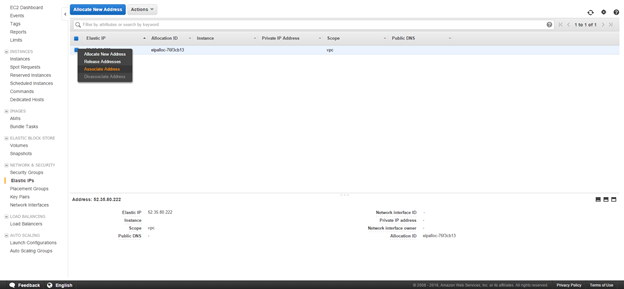
Right click and click on associate IP address
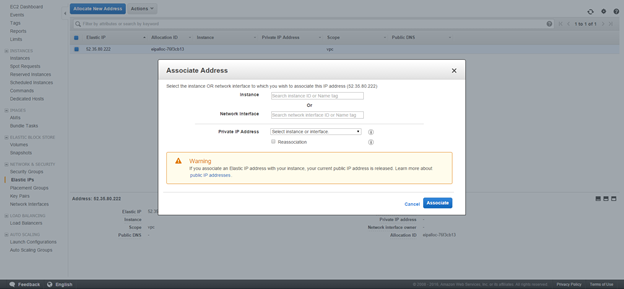
Click on Instance. This gives a list of all the instances created in the first steps.
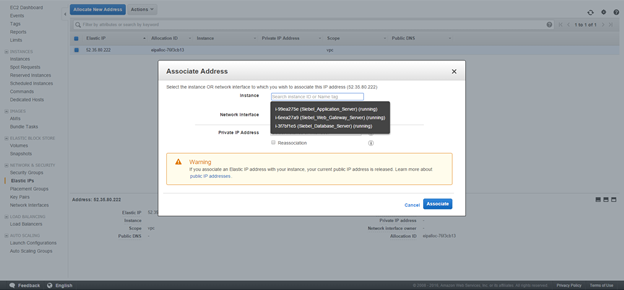
Select the server tagged as the webserver.
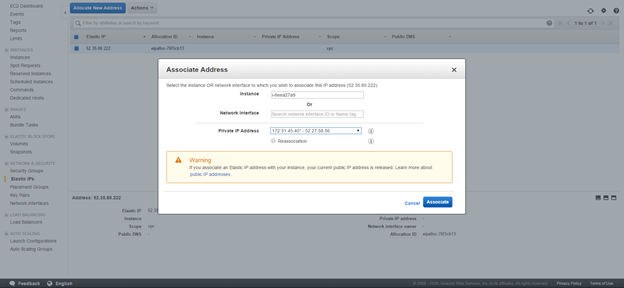
Click on Associate
This concludes the association of the Elastic IP address to the webserver.
Documentation
Navigate to instances
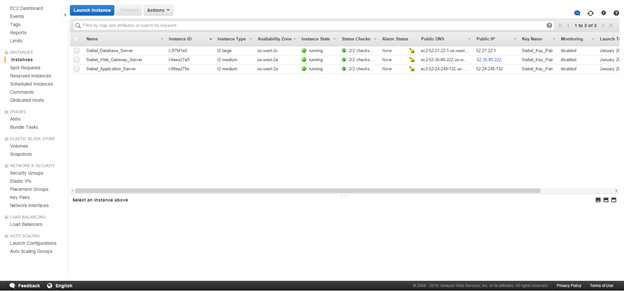
Note down the Name, the instance ID and the Private IP address of each instance. The private IP address can be found by selecting the instance. Please note that the private IP addresses do not change with reboots and these are important since the servers communicate amongst each other using the private IP addresses.
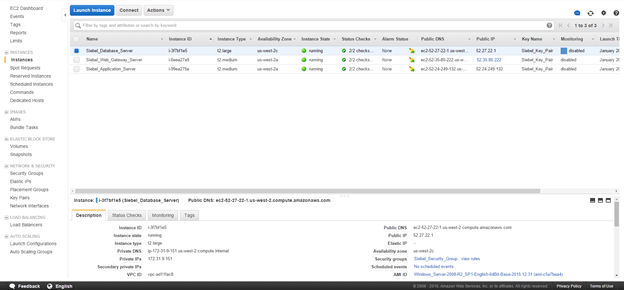
Configuring the security group.
Navigate to Security Group
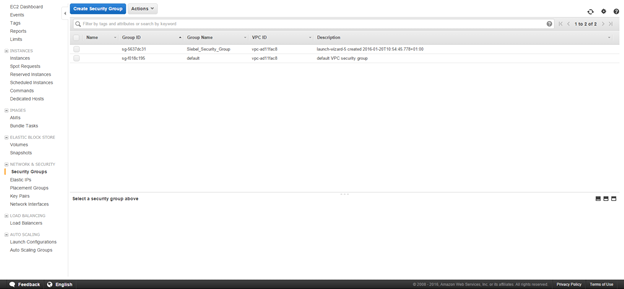
Select the security group and copy the group ID as shown below.
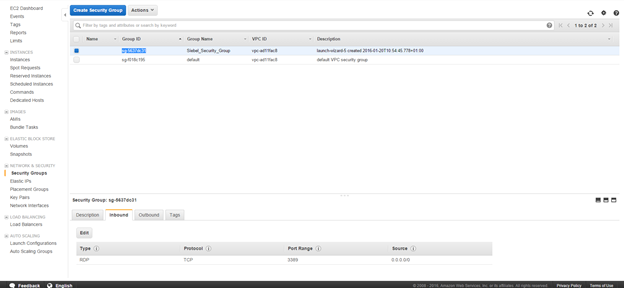
Choose inbound and click on Edit
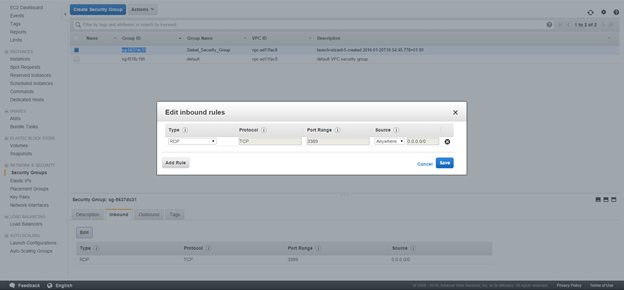
Click on Add Rule
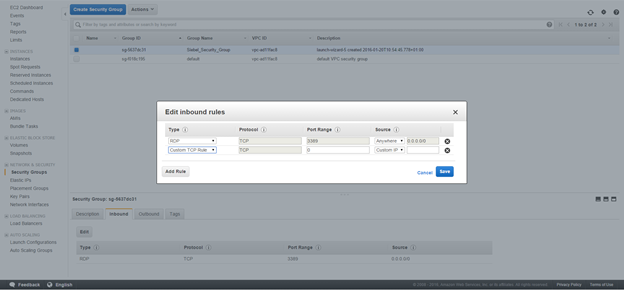
Choose All Traffic in type and Custom IP in source as shown below. Paste the security group name as shown.
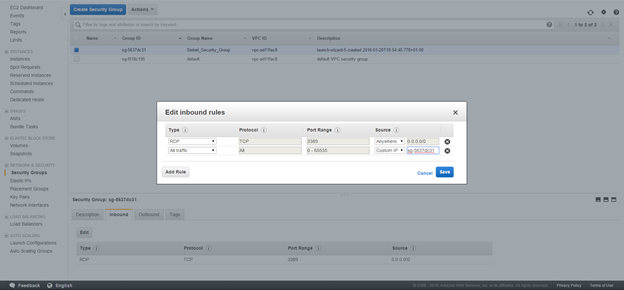
Click on Save. This will allow traffic between the servers. The outbound traffic by default is set to all IP’s.
Add similar rules for HTTP and HTTPS , but from all IP addresses. Please do keep in mind that this will allow traffic from everywhere to the servers. You can also restrict access if required here.
Once completed the structure should look like below:
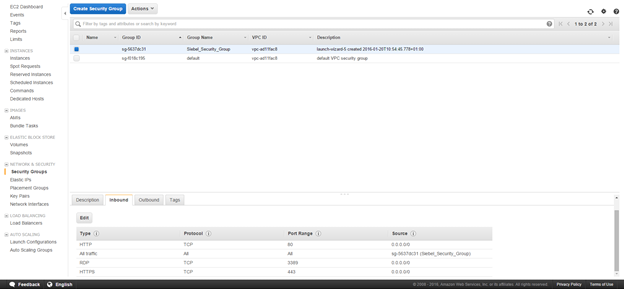
This structure will ensure HTTP, HTTPS and RDP traffic from anywhere and will block all other traffic.
This concludes the configuration of the security group.
Getting the windows password and logging on.
Go back to the instances
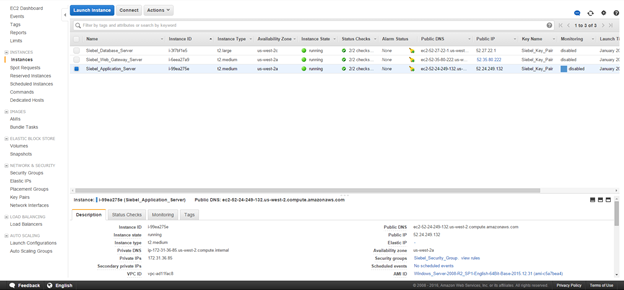
Right Click on a single instance
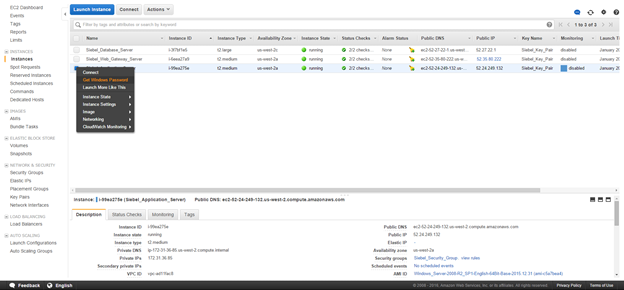
Choose Get Windows Password
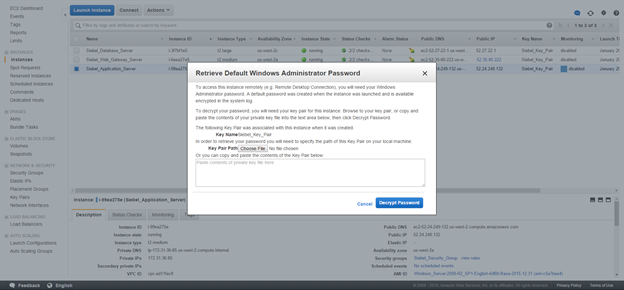
Choose the path to the key pair created earlier.
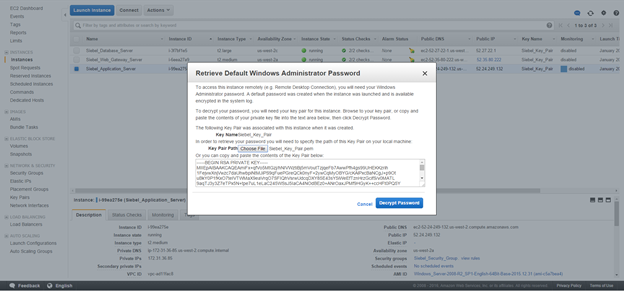
Click on decrypt password
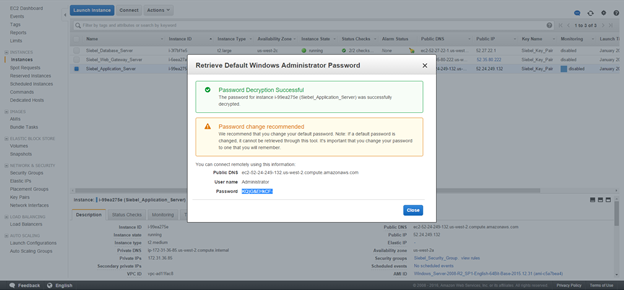
This will give you the Administrator password. Make sure this is saved in the documentation created earlier.
Repeat the same steps for the other servers to retrieve the relevant windows administrative passwords.
Connection to the servers.
Open a terminal services connection
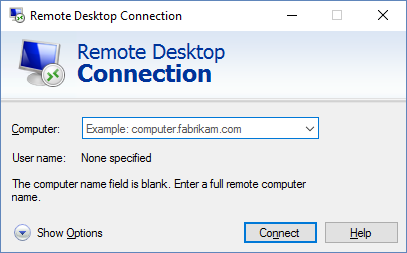
Put the Public IP address for the elastic IP created.
Logon using administrator and the password which was created. Once logged on note the hostname for the server as well. This will be required for future steps.
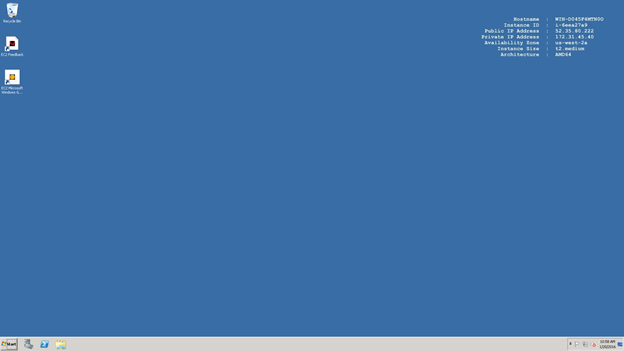
Now connect to the other servers using terminal services and their Public IP addresses. The current Public IP can be found from the console. Please note that this IP address, since it is not an elastic IP will change every time the servers are rebooted.
After you have successfully logged on to all the servers , it makes sense to change the windows administrator password to the same one for all the servers. While this is a security hazard, it helps to maps shared folders without putting in the administrative password every time.
Configuring the Windows Firewall.
The following steps are required so that the servers can communicate amongst each other. By default the windows firewall is switched on and blocks pretty much all the ports between the servers so it will not be possible for the Siebel Application servers to communicate amongst each other.
Bring up the Windows Firewall Administration
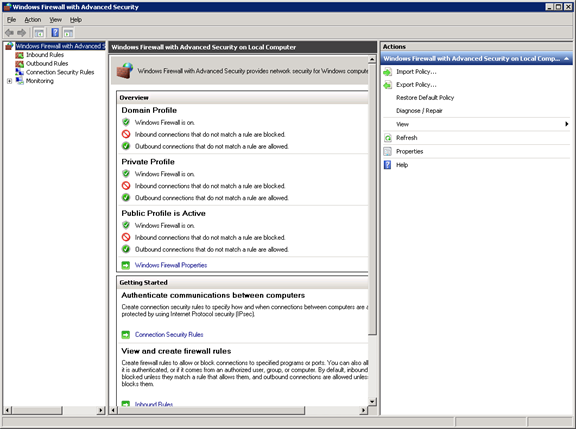
Select inbound rules:
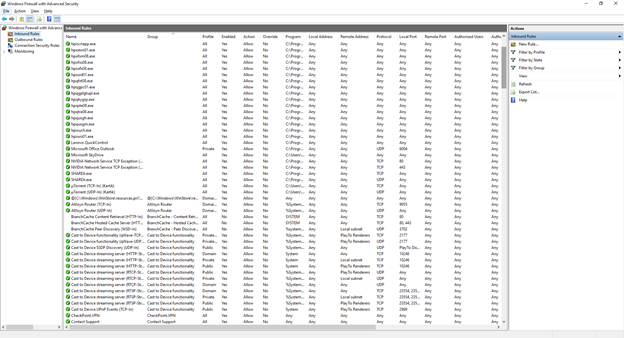
Click on New Rule
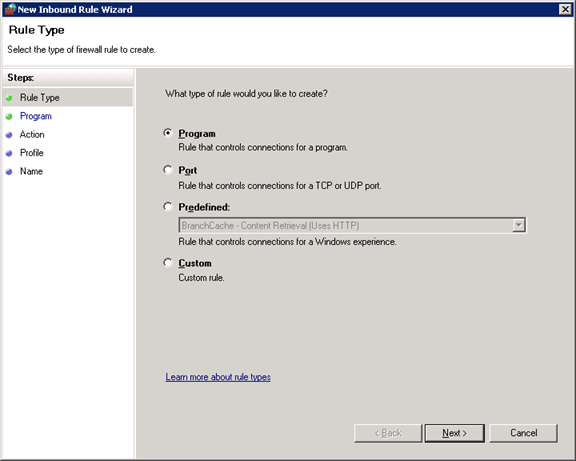
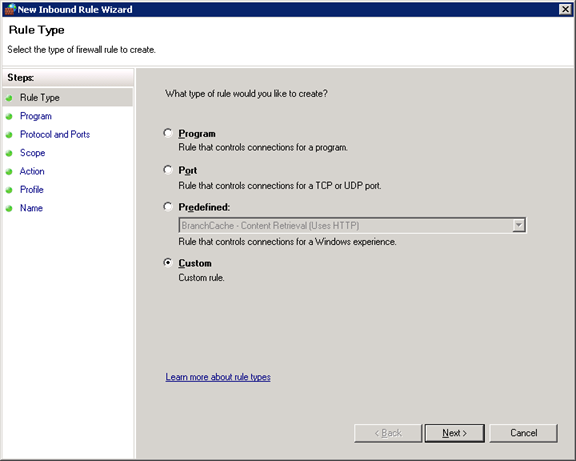
Click on Custom and click next
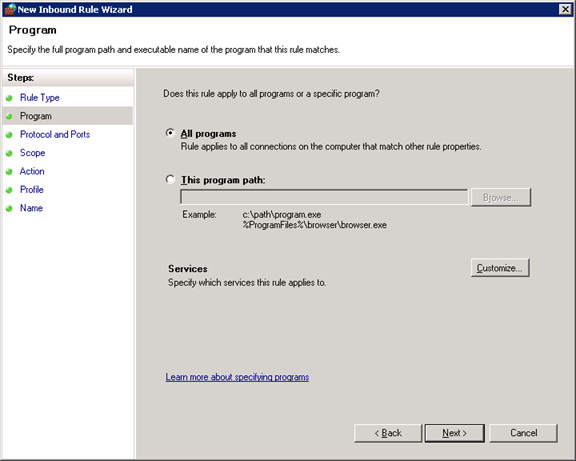
Choose all programs and click next
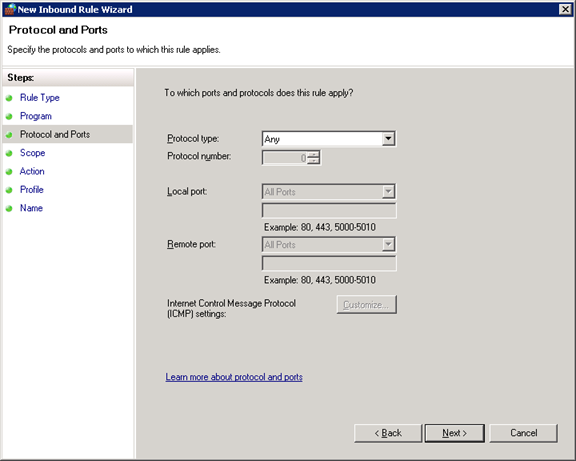
Choose “Any” for Protocol Type and click on next.
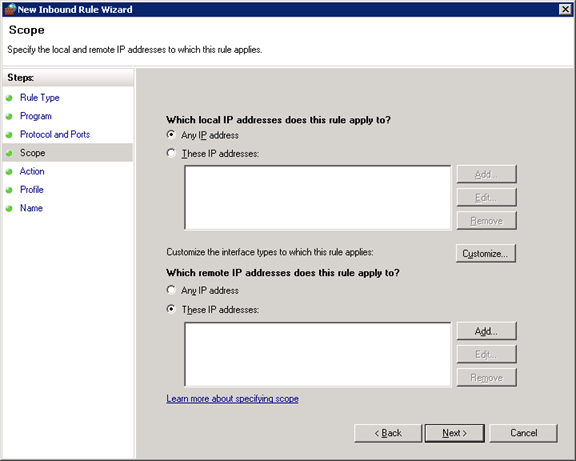
For security purposes choose “These IP addresses” for the remote IP and click on Add
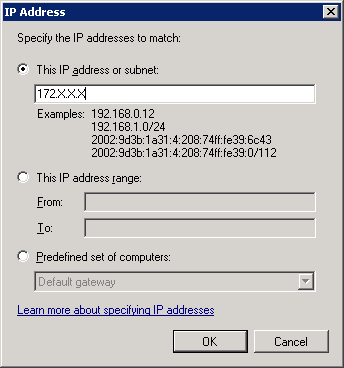
Put down the 172.X.X.X IP addresses which were noted down during the initial documentation. The same step needs to be repeated for all the internal IP addresses which exist in the environment.
Once done, click on next.
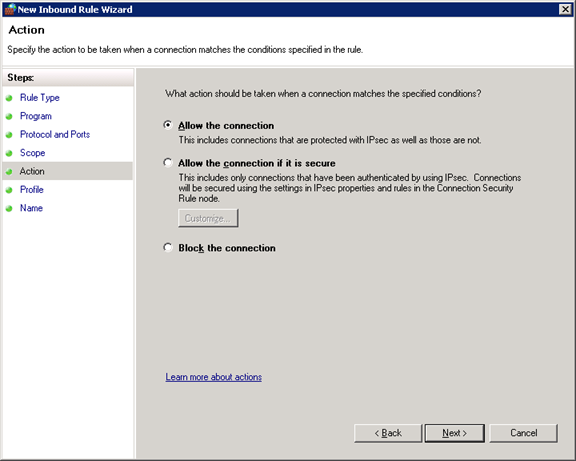
Choose Allow the Connection and click on next.
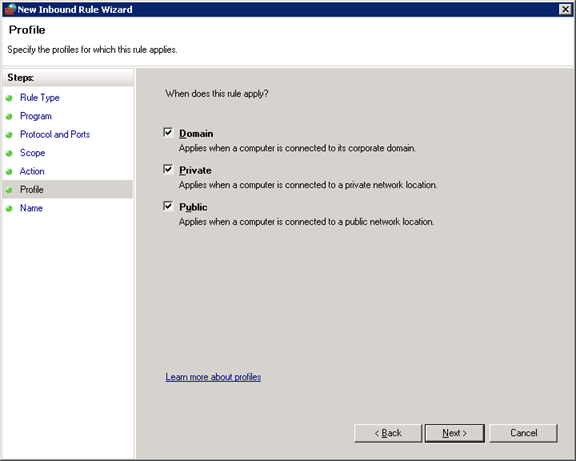
Choose all 3 options and click on next.
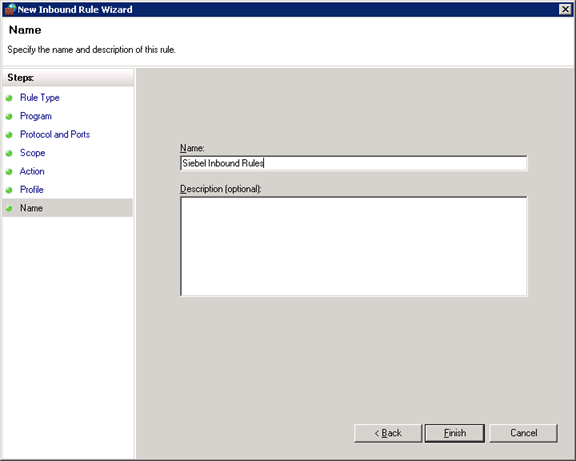
Type a meaningful name for the Rule and Click finish.
The same steps above need to be completed for Outbound rules.
These rules need to be created across all servers. The easy way is to create the rules on one server and just copy it across to the other servers (The ideal usage of a ctrl+C and ctrl+V).
Once these steps are completed. The servers will be able to communicate amongst each other across all the ports.
Editing the hosts file.
Since the Amazon EC2 instances are automatically assigned their internal IP addresses and there is no DNS setup involved, we need to go back to basics to ensure that the servers can be accessed by their hostname or IP address and are capable of translating the two.
Navigate to C:\Windows\system32\drivers\etc
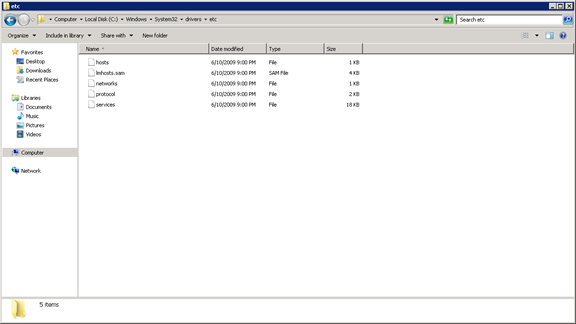
Double Click on the hosts file. This file can be opened by notepad.
The hosts file has the following structure:
# Copyright (c) 1993-2009 Microsoft Corp.
#
# This is a sample HOSTS file used by Microsoft TCP/IP for Windows.
#
# This file contains the mappings of IP addresses to host names. Each
# entry should be kept on an individual line. The IP address should
# be placed in the first column followed by the corresponding host name.
# The IP address and the host name should be separated by at least one
# space.
#
# Additionally, comments (such as these) may be inserted on individual
# lines or following the machine name denoted by a ‘#’ symbol.
#
# For example:
#
# 102.54.94.97 rhino.acme.com # source server
# 38.25.63.10 x.acme.com # x client host
# localhost name resolution is handled within DNS itself.
# 127.0.0.1 localhost
# ::1 localhost
Edit the file so that at the end of the file the IP address and the host names for all the servers documented earlier are entered. Once the edited the hosts file should look like below:
# Copyright (c) 1993-2009 Microsoft Corp.
#
# This is a sample HOSTS file used by Microsoft TCP/IP for Windows.
#
# This file contains the mappings of IP addresses to host names. Each
# entry should be kept on an individual line. The IP address should
# be placed in the first column followed by the corresponding host name.
# The IP address and the host name should be separated by at least one
# space.
#
# Additionally, comments (such as these) may be inserted on individual
# lines or following the machine name denoted by a ‘#’ symbol.
#
# For example:
#
# 102.54.94.97 rhino.acme.com # source server
# 38.25.63.10 x.acme.com # x client host
# localhost name resolution is handled within DNS itself.
# 127.0.0.1 localhost
# ::1 localhost
172.X.X.X WIN-ABCD
172.X.Y.Z WIN-DEFG
172.X.Z.Y WIN-JKLM
Replace the IP Addresses and the hostnames with the relevant entries.
Copy the edited hosts files to all the servers to the same location so that all servers have the same copy of the hosts file.
If this step is completed successfully, you should be able to ping the hostname for all the servers.
This completes the Amazon instance setup.
]]>The classic chicken and egg situation arises since Oracle supports only IE 8.0 with the Siebel High interactivity framework, while Microsoft ended support for IE 8.0 ages ago. Making matters worse was the end of life for Windows XP in 2014 which was the last operating system which had IE 8.0 installed. The end of life for Windows XP essentially meant that the customers had to move to Windows 7, which never had IE 8.0. While there were ways of installing IE 8.0 on the windows 7 operating system, this neither makes sense, nor is it well appreciated by the IT teams in various organizations.
The ideal solution for this scenario is for the customers to upgrade and migrate to Siebel Open UI. This however is not a small or a cheap task.
However, there are ways to make the Siebel high interactivity client work with IE 9 and higher. For IE versions 9.0 and 10, the IE 7 Standards mode can be enabled. For IE versions 11 and the new edge browser, in addition to the IE 7 standards mode, The Enterprise mode website list is also available.
The standards mode is nothing more than running a website in the Internet Explorer Compatibility Mode. The problem with enable the IE 7 standards mode is the fact that all the websites will be rendered in the mode. This will definitely give problems for websites which are designed using newer internet standards.
Enabling the IE 7 Standards mode.
Enabling the IE 7 standards mode is fairly simple.
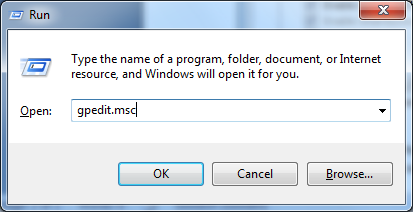
Bring up the group policy editor by typing gpedit.msc.
The Local Group policy editor will open up as shown below.
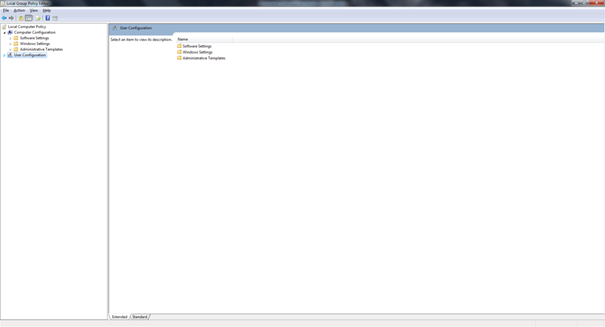
Navigate to User Configuration-Administrative templates-Windows Components-Internet Explorer-Compatibility View as shown in the image below.
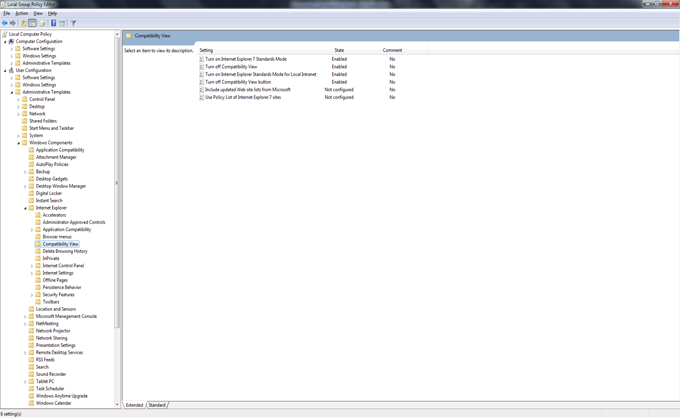
Ensure that the following options are enabled as shown in the image above:
- Turn on Internet Explorer 7 Standards mode.
- Turn off Compatibility View.
- Turn on Internet explorer standards mode for Local Intranet.
- Turn off Compatibility View button.
This will enable the IE 7 Standards mode for all websites. Using this will make the Siebel application behave itself on the IE 9 and IE 10.
Using the Enterprise Mode for IE 11 and the Edge Browser.
While the IE 7 standards mode is a decent workaround, the Enterprise mode is a much better solution as it offers a selection of websites which be rendered using the enterprise mode. More importantly this list of websites can be managed centrally and the policy setting just needs to point to the xml file holding these websites. To create the website list the Enterprise Mode Site List manager tool needs to be downloaded from Microsoft (https://www.microsoft.com/en-us/download/details.aspx?id=49974) .The tool essentially creates a list in the v2 XML schema.
To enable the Enterprise mode, the following steps need to be followed.
Bring up the group policy editor
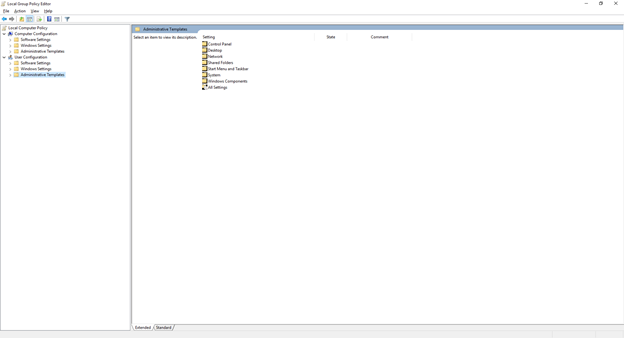
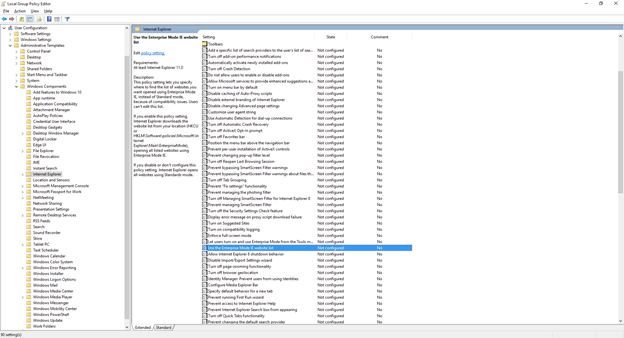
Navigate to Navigate to User Configuration-Administrative templates-Windows Components-Internet Explorer and select the “Use the Enterprise Mode IE website List”
Open the setting and enable it.
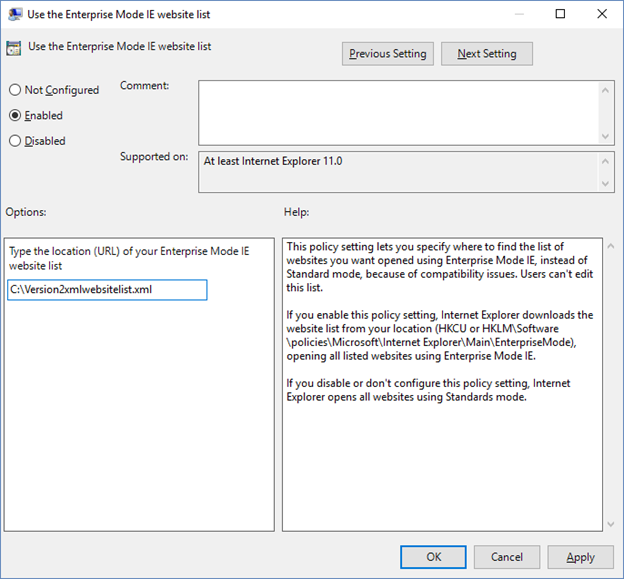
The website list needs to point to the file created using the tool as described earlier.
These 2 methods will allow a customer to run Siebel in later versions of IE till the actual upgrade is completed and Siebel Open UI is deployed.
The key thing which needs to be understood is that this is only a workaround and not a final solution. There are a lot of known issues with Siebel running on versions of IE other than IE 8.0. However, after applying the workarounds, most of these issues occur quite rarely. Some of these are mentioned below:
Crashes:
- While doing File –> Logout , Application crashes
- If a modal confirm box is called from a pick/MVG applet, the Siebel application crashes (hangs and doesn’t respond). User has to end and restart the Siebel session.
Functional Issues
- Attached Network File URL’s do not work.
- Keystrokes not registering as input in UI.
- When the Mouse is over a Hyperlink, it is not changing to “Hand” sign, it stays as it is.
- When using short keys (like Ctrl+Alt+K) short cut keys only work intermittently.
- Pick List or MVG Applets not closing by X button.
Focus, formatting issues & Error messages
- When there is a delay in response, Intenet Explorer shows a message indicating that the server is not responding with a button offering to recover the session.
- Various UI related error messages in the UI such as “The applet field with name “s_1_2_45_0″ doesn’t exist(SBL-UIF-00289)”
- A modal confirm box, when invoked from a form or list applet, disappears in the background. User has to minimize all windows and find the pop up window to proceed ahead with their task.
- When trying to open a MVG applet the pop-up applet appears in small size in top left
References
Oracle Support Document 1627168.1: https://support.oracle.com/epmos/faces/DocumentDisplay?id=1627168.1 (Requires Oracle Login)
Enterprise mode for IE 11 and Edge Browsers: https://technet.microsoft.com/en-in/library/dn640699.aspx
]]>Even in the 21st Century the carrot and stick approach in every day society has not changed. While good behavior is rewarded, bad behavior is punished albeit people not getting beheaded anymore. The management of this behavior has been called by a number of names over the centuries, the most current being Loyalty. While loyalty can be of many types , be it between citizens and a government , or resellers and distributors with a principle the predominant one is the one between a customer and a provider.
Loyalty management inherently follows saturation in a certain industry. The first industries which got hit by this phenomenon were the Hospitality and the airline industries in the late 20th century. What these industries realized was that price wars alone cannot keep a customer with your specific organization. While it will work for a little while, it is just be a matter of time till your competitor came up with a lower price pulling your customers towards them. The industries further realized that in a saturated market what actually can retain your customers is providing something extra in terms of service. This laid the foundation of what is modern loyalty. Concepts of loyalty memberships, loyalty cards, tiers, rewards were all born with this. In the eighties the same phenomenon hit the consumer goods industry with severe competition amongst various department stores.
The nineties did this to the telecom industry. With more and more governments opening up the industry to private players, the monopoly situation enjoyed by telecom providers ended. Every telecom wanted to ensure that the customer stuck to them and did not change the providers frequently. Initiatives like number portability which allowed customers to retain their number even if they want to change a provider, did not help the telecom provider’s case either. As it had done in the past, loyalty followed this saturation, with telecom players rewarding the end customer’s behavior.
There was however a big difference between the telecom providers and the other industries. While the other industries actually sold a physical product or gave tangible services, the services provided by the telecom players was very different. The definition of behavior was also very different for a telecom player. So how did the telecoms reward this behavior?
The early loyalty programs in a telecom were centered around billing amounts and points given if paid on time. Over a period the accumulated points could be redeemed for other services within the same telecom or be used to pay off a bill partially. This however was not a sustainable way of rewarding behavior and following the lead of the airline and the hospitality industry telecom providers started partnering with other organizations to allow their customers to redeem points to purchase anything from a pen to a holiday.
With the advent of convergence and VAS, the telecom providers also realized the fact that certain services they provided are not as profitable as some of the others. For example a local call within the same provider, especially with extremely low pricing, had a very low margin for the provider. On the same hand a customer buying a value added service, be it a ringtone or a wallpaper, was much more profitable. Most of the telecom’s very quickly realized that the cost associated with a point given to a customer is coming out of their pocket directly and can be extremely significant in organizations with a high customer base. This put up a major requirement that the number of points given to an end customer should vary based on the services used and not just a flat number of points based on a billing amount. This meant that depending on multiple conditions, for example usage of the services in a local call, sending a SMS, usage of the phone in roaming, usage of a phone for international dialing or purchase of VAS, should give different points to the customer the more profitable services giving more points thereby encouraging the behavior of the customer to buy more profitable services for a reward.
In today’s scenario almost all the telecom providers have some or the other form of loyalty programs. While some of them might be by invite only, some maybe open for everyone. The way of rewarding behavior has also been evolving over time with some of the providers still giving points on the bill amount, with the more mature providers giving specific points for specific services. While the way of giving points (accruals) may vary, the way to use the points (redemption) typically can be either against Value added services or products from external partners.
As the market evolves, the concept of Loyalty is not restricted to customers alone. This has been extended further to the partners. This is of particular interest in countries where the sales of telecom player’s service to end customer is managed by a retail setup. For example in countries like India, which is predominantly a prepaid market, the services are sold by small shops many of whom have absolutely no brand loyalty and will sell the services of competing products if they get a higher margin in the process. The other aspect to the partner network which needs to be understood is that while the handset or the SIM card or the initial package is a onetime sale, it still goes through a typical consumer goods setup i.e the provider selling to a distributor who sells to a dealer who in turn sells to a retailer. This effectively extrapolates the customer network to include subscribers (end customers), Distributors (First level Customers), Dealers (Second Level customers) and retailers (Third level customers). The carrot and stick approach works here as well. The bonuses paid out to the first, second and third level of the sales chain is dependent purely on the number of products sold, since the first sale is a physical product (SIM card with a plan). However, the retail network is the one which needs to be differentiated since they are also responsible for topping up or recharging the subscribers prepaid connection. This is the recurring revenue all the telecom providers are vying for. Depending on the rewards offered the retailers can convince the subscriber and control the amount which the customer wants to recharge.
In summary loyalty is here to stay , it is just the players who are changing.
]]>
All the organizations, globally, have historically deployed one or the other form of a customer relationship management tool. In the late nineties, the buzz word was ERP or enterprise resource planning and how it can change the very way organizations function and how it could improve revenues for the customer. This was followed by CRM or customer relationship management in the early twenty first century. All the CRM application promised that they would help organizations manage their customers better, manage all the customer facing processes better and in turn increase revenue. However, now in the second decade of the twenty first century, most organizations are realizing that not all of the above materialized for them.
Why did this happen?
Why most CRM deployments resulted in failure is because of multiple aspects the main one’s are listed below:
- Running a CRM project like an IT project: In the nascent stage of CRM, organizations could not distinguish between an IT application and a business application. CRM is an application which directly impacts revenue and successful projects are those where the entire lifecycle of the application is controlled by the business.
- A requirement based approach rather than a process based approach: CRM is built around processes. Giving individual requirements leads to unnecessary customizations and it also leads to looking at a small picture rather than the overall picture which is critical for the success of the project.
- Choosing the wrong tool for the job: This again is directly related to the first point. The lack of involvement of the business in the decision making process and the evaluation process leads directly to choosing an application or modules of an application incorrectly, which leads to heavy customization and in turn to a sluggish white elephant which does not deliver.
- No in house skills: Heavy dependence on the vendor or a systems integrator lead to unnecessary development activities and unnecessary cost overruns. Most of the systems integrator resources rarely understand the business and instead develop an application as if developing a new application, which simply does not work with off the shelf products.
- The “me too” game: A lot of organizations went for CRM application because their competitors went for it. However the organizations themselves were not ready to deploy any kind of CRM tool.
What was the end result?
The points mentioned in the previous section led to the following cases:
- Incorrect CRM tool: All CRM applications have strengths and weaknesses. Organizations with incorrect CRM tools have spent so much on the deployment, they are in a position where they are hesitant to change over or do the same exercise again.
- Scrapped Projects: After spending millions of dollars in licenses, the organizations scrapped their entire CRM project because it either took too long to deploy or multiple vendors came in and did not do a good job of it, leading to unnecessary cost over runs.
- Working on prior releases: Because of the fact that it took too long to deploy the CRM and making it stable, finally, customers are hesitant to go through the effort again.
- Frustrated Organizations: Went back to working their original ways, despite having a CRM application in place. The end result being that the entire investment is a dead investment.
What tool is right for me?
Before we get to the point of what tool is right for me, we need to realize if the organization itself is ready for CRM or not. The successful CRM projects are those where organizations have changed their processes to match the inherent processes of the application itself and then tweaked the application minimally to match some of their processes which are not available. It is important to understand that CRM is an attitude, it is not just another application or another tool.
With the plethora of CRM applications around it is hard for an organization to choose the right application. The time spent on this will decide the future outcome of the project. I have come across organizations spending millions on an application like Siebel from Oracle only to use rudimentary, sales, service and marketing functionalities. Something which could have easily been achieved by CRM applications like Sales Force or even Sugar CRM at a fraction of the cost.
The evaluation of the tools comes to 4 basic questions:
- Do I have my processes documented?
- Which of these processes do I need to automate?
- What is the timeline in which I need to automate these processes?
- Are there any laws governing storage of this data?
The answers to the above questions will give you an accurate representation of the kind of application which you should be looking at. As an extremely simplified example let us take a case of two greenfield telecommunications companies operating in different locations globally.
Company A Brief:
- Operates from Continental Europe.
- Has documented the Sales, Service and the marketing processes.
- Has a timeline of 3 months.
- Wants to establish a customer database and deploy only the service and marketing processes i.e any process involving subscriber acquisition and retention.
- Customer data needs to be stored somewhere in continental Europe.
Company B Brief:
- Operates from India.
- Has documented Sales, Service, Marketing, Product, Orders and Asset Management processes.
- Has a timeline of 1 year.
- Wants to go live with all the processes on an enterprise CRM.
- Subscriber must be store in a company owned data center in India as required by Law (As of 2010)
If we take the case of company A, the time to market is extremely low hence a quick deployment is warranted. Secondly the company wants to deploy only the service and the marketing processes to target acquisition and retention of new subscribers. Thirdly the data can be stored in any data center. Given this the ideal CRM for this organization would be a cloud based CRM like Salesforce. The reason for this being the following:
- Extremely quick to deploy with successful implementations.
- Cloud based CRM with data centers in Europe.
- Standard service and marketing functionality available with little or no tweaking to the application required.
However in the case of Company B, the time to market is fairly relaxed. The processes, particularly the Products, Orders and asset management are extremely complex. The data must be stored in a company owned data center. This limits the choice of CRM to enterprise CRM applications like Siebel or Microsoft Dynamics.
Irrespective of the choice of the application some rudimentary rules must be followed for any CRM deployment:
- The organization must become CRM ready as in the business group must decide and finalize the processes involved, specific and cross functional.
- After choosing the CRM, the correct modules required must be chosen. All vendors will try to maximize the sale, the choice however is always dependent on the organization.
- If the organization is not using internal resources the systems integrator must match the organizations ideology. A lot of very expensive CRM projects have failed because if this one rule.
- Architecture of the overall application infrastructure. CRM, even if only basic processes are deployed can exist as a standalone system. It must be integrated with other applications. At the bare minimum it will definitely need to be integrated with some kind of an analytical application.
Final Words
As mentioned earlier, CRM is an attitude and process driven. The correct approach to deploying it would mean the difference between a successful implementation and a lot of heartache.
]]>
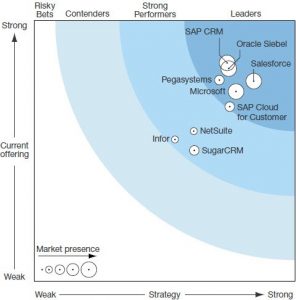
This is despite the fact that around 2011-2012, Oracle invested heavily in the Fusion CRM stack, which unfortunately did not stack up well against the competition. In early 2013, Oracle restarted the development on the Siebel application stack and has been consistently delivering enhancements to the application year on year in terms of Innovation packs. The key change has been the deployment of the Open UI architecture. While this came out with the Siebel Version 8.1.1.9 or patchset 9 on top of Siebel version 8.1.1. The open UI architecture dramatically changed the user perception around the Siebel UI, since this effectively made Siebel browser independent from the previous dependence on Internet Explorer. The earlier dependence was primarily because the Siebel High interactivity client was heavily dependent on Active X controls. Over the last few years as Oracle launched the innovation packs (IP 2015 is current) , this dependency has been done away with.
The new innovation packs are also adding in a lot of processes along with fixing bugs on the way. The biggest of the changes is that with IP 2015 , Siebel tools, which was a thick client being used for any kind of development has now become Siebel composer, a web based tool similar to most of the development clients for Cloud CRM’s. This significantly reduces development and deployment times and finally we can have zero downtime deployments as is common with most cloud applications.
Now the big question which comes to haunt the existing Siebel customers on why they should upgrade and how the upgrade process should be managed.
The existing Siebel customers fall into 2 distinct brackets:
- Old Siebel customers who deployed Siebel 15 odd years ago with Version 6 (Siebel 2000) and upgraded to Siebel 7.X and then Siebel 8.0. (From the Oracle reports it appears that almost all of the Siebel customers moved to Siebel 8.0 since that is the version Oracle started the lifetime support from)
- Recent Siebel customers who deployed Siebel 8.1.X.
This article is primarily for the first set of Siebel customers.
Why should we upgrade to the new version?
- Siebel 8.X supports only the high interactivity framework. This is supported officially only on IE 8.0. IE 8.0 is no longer supported by Microsoft. While there are ways to make the HI framework work on IE 9 and higher, these are not supported by Oracle. As per recent updates Microsoft is no longer supporting any IE version and instead supports only the edge browser.
- A lot of objects which are standard in the newer version were not available in the older versions. This led to customizations in terms of new tables, business components, business objects and the relevant UI objects on top of these. The new objects effectively make the custom objects redundant.
- Most of the older versions of Siebel were dependent on scripting for basic things like data validations and these have been carried forward through the previous upgrades. Siebel, over the last few versions, has been reducing the dependence on scripting and increasing the dependence on workflows. These are available out of the box.
- Due to the lack of a proper workflow engine in the previous versions, customers had a tendency of putting in business services for managing the business logic. The newer version would have a lot of these business logic by default.
- The data models have been changed dramatically. As an example the address model has been completely changed. In versions prior to Siebel 8.0, Siebel had a concept of maintaining business addresses (Account Address) and personal addresses (Contact Address) separately. This was changed completely by having one common address table and maintaining intersection tables and the relevant joins for accounts and contacts.
- The Siebel horizontal application (SEA) does not exist anymore. The organizations must migrate to Siebel industry applications (SIA).
- The newer versions are 64 bit and not 32 bit and hence support newer versions of hardware and operating systems.
Should we upgrade or re-implement?
The next key question which is asked is if the CRM installation should be upgraded as is, or should there be a reimplementation. The answer however is not that simple. Based on the previous section let’s weigh the pros and cons of both.
Reimplementation
Pros
- This gives the organization to start with a clean slate and get rid of any old customizations which make no sense in the current world.
- Custom objects which have been created in terms of new tables, business components, business objects and the relevant UI objects on top of these may be redundant with vanilla objects replacing them. While these do get upgraded, it makes sense to use the vanilla objects. The primary reason, being that the inherent business processes around these vanilla objects have been tuned for performance. More importantly these processes will get upgraded in future releases based on customer feedback.
- Using scripting for data validation is effectively redundant. There are user properties and the data validation manager available for the same. The scripts (especially Siebel VB Script) does not get upgraded properly and can lead to significant performance issues as well. Trying to get rid of the scripts by going through lines and lines of code and setting up corresponding rules is an exercise which is best left alone, as it adds a lot of delay to the upgrade project.
- Many of the business services created by organization to manage business logic or integration have been done away with, by vanilla workflows and business services. Again these vanilla objects are tuned for performance and will always get upgraded with future releases.
- The upgrade will not accept custom data models for critical changes, for example the address data model. The upgrade will force the change. This leads to a lot of effort in changing the existing setup by identifying every single entity which is accessing the old structure.
- Reimplementation gives the comfort that there is an existing application live, while the new development goes on in the background.
Cons
- The reimplementation, while it has a lot of benefits, will definitely be longer than an in place upgrade. This is primarily because of the fact that it has to be treated as a new implementation.
- Since the application itself will be new, the test scripts will need to be re done.
Upgrade
Pros
- An in place upgrade has a shorter deployment cycle than a reimplementation.
- The organization has a comfort factor that whatever has been deployed can easily be tested and signed off.
Cons
- The application will not be future proof. The new business processes will not be taken up as effectively the application will still have the old custom code, only that it will be under a new hood.
- There can be significant performance issues.
- The errors induced because of an in place upgrade will re occur every time a new innovation pack is deployed.
In short, for the old Siebel customers, the best way forward is a reimplementation.
For the existing pre Siebel 8.1.1.9 customers, the upgrade is fairly straight forward. For these customers the ideal way would be to have an in place upgrade rather than have a reimplementation.
References
- http://www.pega.com/forrester-crm-2015
- https://support.oracle.com/epmos/faces/DocumentDisplay?id=2023750.1 (requires Oracle Login)