As per the Forrester Wave Report for Customer Relationship Management applications, Oracle’s Siebel CRM is still quite a far way at the top.
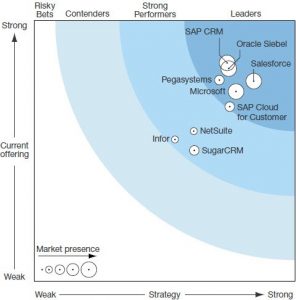
This is despite the fact that around 2011-2012, Oracle invested heavily in the Fusion CRM stack, which unfortunately did not stack up well against the competition. In early 2013, Oracle restarted the development on the Siebel application stack and has been consistently delivering enhancements to the application year on year in terms of Innovation packs. The key change has been the deployment of the Open UI architecture. While this came out with the Siebel Version 8.1.1.9 or patchset 9 on top of Siebel version 8.1.1. The open UI architecture dramatically changed the user perception around the Siebel UI, since this effectively made Siebel browser independent from the previous dependence on Internet Explorer. The earlier dependence was primarily because the Siebel High interactivity client was heavily dependent on Active X controls. Over the last few years as Oracle launched the innovation packs (IP 2015 is current) , this dependency has been done away with.
The new innovation packs are also adding in a lot of processes along with fixing bugs on the way. The biggest of the changes is that with IP 2015 , Siebel tools, which was a thick client being used for any kind of development has now become Siebel composer, a web based tool similar to most of the development clients for Cloud CRM’s. This significantly reduces development and deployment times and finally we can have zero downtime deployments as is common with most cloud applications.
Now the big question which comes to haunt the existing Siebel customers on why they should upgrade and how the upgrade process should be managed.
The existing Siebel customers fall into 2 distinct brackets:
- Old Siebel customers who deployed Siebel 15 odd years ago with Version 6 (Siebel 2000) and upgraded to Siebel 7.X and then Siebel 8.0. (From the Oracle reports it appears that almost all of the Siebel customers moved to Siebel 8.0 since that is the version Oracle started the lifetime support from)
- Recent Siebel customers who deployed Siebel 8.1.X.
This article is primarily for the first set of Siebel customers.
Why should we upgrade to the new version?
- Siebel 8.X supports only the high interactivity framework. This is supported officially only on IE 8.0. IE 8.0 is no longer supported by Microsoft. While there are ways to make the HI framework work on IE 9 and higher, these are not supported by Oracle. As per recent updates Microsoft is no longer supporting any IE version and instead supports only the edge browser.
- A lot of objects which are standard in the newer version were not available in the older versions. This led to customizations in terms of new tables, business components, business objects and the relevant UI objects on top of these. The new objects effectively make the custom objects redundant.
- Most of the older versions of Siebel were dependent on scripting for basic things like data validations and these have been carried forward through the previous upgrades. Siebel, over the last few versions, has been reducing the dependence on scripting and increasing the dependence on workflows. These are available out of the box.
- Due to the lack of a proper workflow engine in the previous versions, customers had a tendency of putting in business services for managing the business logic. The newer version would have a lot of these business logic by default.
- The data models have been changed dramatically. As an example the address model has been completely changed. In versions prior to Siebel 8.0, Siebel had a concept of maintaining business addresses (Account Address) and personal addresses (Contact Address) separately. This was changed completely by having one common address table and maintaining intersection tables and the relevant joins for accounts and contacts.
- The Siebel horizontal application (SEA) does not exist anymore. The organizations must migrate to Siebel industry applications (SIA).
- The newer versions are 64 bit and not 32 bit and hence support newer versions of hardware and operating systems.
Should we upgrade or re-implement?
The next key question which is asked is if the CRM installation should be upgraded as is, or should there be a reimplementation. The answer however is not that simple. Based on the previous section let’s weigh the pros and cons of both.
Reimplementation
Pros
- This gives the organization to start with a clean slate and get rid of any old customizations which make no sense in the current world.
- Custom objects which have been created in terms of new tables, business components, business objects and the relevant UI objects on top of these may be redundant with vanilla objects replacing them. While these do get upgraded, it makes sense to use the vanilla objects. The primary reason, being that the inherent business processes around these vanilla objects have been tuned for performance. More importantly these processes will get upgraded in future releases based on customer feedback.
- Using scripting for data validation is effectively redundant. There are user properties and the data validation manager available for the same. The scripts (especially Siebel VB Script) does not get upgraded properly and can lead to significant performance issues as well. Trying to get rid of the scripts by going through lines and lines of code and setting up corresponding rules is an exercise which is best left alone, as it adds a lot of delay to the upgrade project.
- Many of the business services created by organization to manage business logic or integration have been done away with, by vanilla workflows and business services. Again these vanilla objects are tuned for performance and will always get upgraded with future releases.
- The upgrade will not accept custom data models for critical changes, for example the address data model. The upgrade will force the change. This leads to a lot of effort in changing the existing setup by identifying every single entity which is accessing the old structure.
- Reimplementation gives the comfort that there is an existing application live, while the new development goes on in the background.
Cons
- The reimplementation, while it has a lot of benefits, will definitely be longer than an in place upgrade. This is primarily because of the fact that it has to be treated as a new implementation.
- Since the application itself will be new, the test scripts will need to be re done.
Upgrade
Pros
- An in place upgrade has a shorter deployment cycle than a reimplementation.
- The organization has a comfort factor that whatever has been deployed can easily be tested and signed off.
Cons
- The application will not be future proof. The new business processes will not be taken up as effectively the application will still have the old custom code, only that it will be under a new hood.
- There can be significant performance issues.
- The errors induced because of an in place upgrade will re occur every time a new innovation pack is deployed.
In short, for the old Siebel customers, the best way forward is a reimplementation.
For the existing pre Siebel 8.1.1.9 customers, the upgrade is fairly straight forward. For these customers the ideal way would be to have an in place upgrade rather than have a reimplementation.
References
- http://www.pega.com/forrester-crm-2015
- https://support.oracle.com/epmos/faces/DocumentDisplay?id=2023750.1 (requires Oracle Login)


Leave a Reply